Your calls,
written down.
Your follow-ups, handled.
Megaphone records any call and writes the notes, with or without a bot. Its keyboard types what you say in any app. Then ask Preeya: “What did I promise the client?”
30 minutes free · No credit card · Works offline
Them So the renewal is coming up in January and we'd like to keep the price where it is.
You If we include onboarding for the new team, we can do eighteen thousand.
Them That works. Send the revised proposal by Friday and loop in Priya.
You Perfect, I'll send it today
Acme renewal
- Renews at $18k with onboarding included
- Priya (finance) to approve
- Send revised proposal · Fri
- Loop in Priya
• iPhone update ships Tuesday
To-dos
☐ Shubham: ship iPhone update (Tue)
☐ Ajay: finish API (by the 30th)
Notes for every call. You pick: bot or no bot.
Record any Zoom, Meet, Teams, Slack or phone call right from your computer, with no bot joining. You get live captions while you talk. Or send Megaphone into the meeting when you can't be there. Either way you get a summary, decisions and to-dos within moments of hanging up.
More about meeting notes →Every call ends with a to-do list. Tap once and Preeya does it.
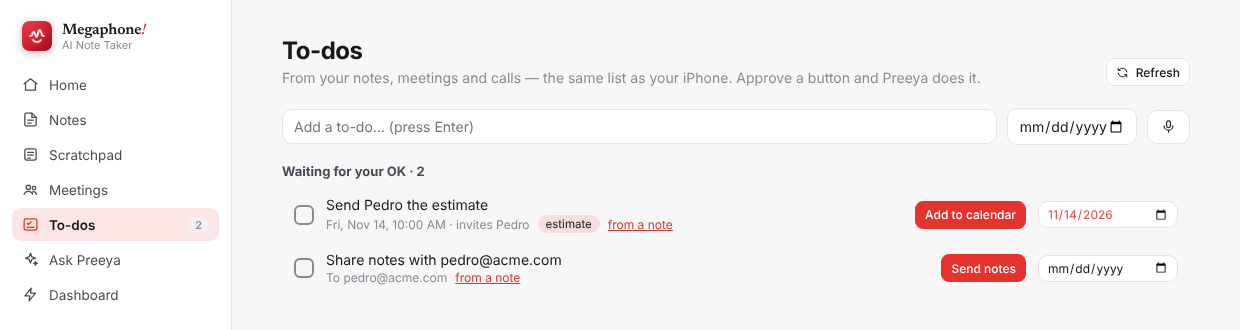
Megaphone pulls the promises out of every call and note: who owes what, by when. Some to-dos come with a button, like Add to calendar or Send notes. Approve it, and it's done. Need the follow-up email? Preeya drafts it from what was agreed.
Captured for you
To-dos appear the moment a call ends, with owners and due dates. Nothing to type.
One tap to finish
Approve and Preeya sends the notes or puts it on the calendar. Skip, and nothing is sent.
One list everywhere
The same list on your iPhone, computer and the web: overdue, today, upcoming.
Talk 3× faster than you type.
Hold one key (fn on Mac, Right Ctrl on Windows and Linux) and speak. Megaphone removes the “ums,” adds punctuation and drops clean text wherever your cursor is: email, Slack, Word, ChatGPT, your code editor, anywhere.
- Learns your names and words from your fixes and contacts
- Modes for email, messages, notes, AI prompts, replies and SOAP notes
- Select text and say “make it shorter,” “more professional” or “bullet points”
After the call, someone to turn to.
Megaphone writes the notes. Preeya, your built-in assistant, helps you use them. Ask her right beside your notes, about one call or every call you've ever recorded.
Your words can stay on your computer.
Most AI note takers send every word to the cloud. Megaphone can transcribe and write notes right on your computer, and it keeps working on a plane, in a hospital or in a courtroom. You choose:
On this computer + sync
Recommended. Megaphone works on your computer, then syncs notes to your phone and the web.
On this computer only
Nothing leaves your computer. Works fully offline.
Megaphone cloud
For older computers. Fast, accurate transcription on our servers.
Not sure which fits? During setup, Megaphone runs a 20-second speech test and recommends the best option for your computer. How on-device works →
Everything Megaphone does
Dictation anywhere
Voice typing in every app, cleaned up as you go.
Learn more →Meeting notes
With or without a bot. Live captions, summaries and to-dos.
Learn more →Ask Preeya
“What did we decide about pricing?” Answers from all your notes.
Learn more →99 languages
Speak any of them. Get notes in the language you choose.
Learn more →SOAP notes
Clinicians: speak the visit and get a structured SOAP note.
Learn more →Learns your words
Names, jargon and spellings, learned from your fixes and contacts.
Learn more →Switching from Wispr Flow, Granola or Otter? Your first 30 minutes are free. See how they compare →
Easier for seniors. Built for accessibility.
If typing is slow, painful or tiring, because of arthritis, a wrist injury, limited mobility, low vision, dyslexia or simply age, Megaphone lets you write by talking. One key. No new tricks to learn. Live captions help when calls are hard to hear.
Questions people ask
What is Megaphone?
Is Megaphone free?
Does Megaphone work offline?
Does Megaphone join my meetings as a bot?
Who is Preeya?
Keep reading
Megaphone for seniors
Megaphone is simple voice typing for seniors. Press one key, talk, and your words appear in email, Facebook, WhatsApp and more. Also records notes from doctor visits.
Megaphone vs Wispr Flow
Wispr Flow is excellent, polished cloud dictation, and it now has a bot-free Notetaker too. Megaphone does bot…
Best AI note takers 2026
Best AI note takers of 2026 compared: Megaphone, Granola, Otter.ai, Wispr Flow Notetaker. Bot vs bot-free, offline support, platforms and pricing.
Try Megaphone free.
30 minutes free. No credit card. Mac, Windows, Linux and iPhone.